Chapter 7: Models, Tokens, and Cost
A short word on language before we start. Clinicians who have worked with statisticians or data scientists are used to the word model meaning a logistic regression, a Cox model, a Kaplan-Meier curve — a mathematical object that predicts an outcome from inputs.
That is not what “model” means in this chapter. Here, a model means the underlying artificial intelligence — the large language model (LLM) — that Claude Code is talking to under the hood. Anthropic makes several. They have different sizes, different costs, and different strengths, and choosing among them is what this chapter is about.
🧠 Remember. In this book, “model” means the LLM (the underlying AI). Not a statistical model. Not a regression. The LLM.
The three models, with a triage analogy
Anthropic ships three model families. The names are a little opaque on first reading, so use this triage analogy.
-
Haiku — the triage nurse. Fast. Cheap. Excellent at quick, structured tasks: classify this comment, extract these five fields, sort this list. Not the one you want for a complicated diagnostic puzzle, but you would not call a subspecialist for a sprained ankle either.
-
Sonnet — the general medicine consult. Smart, fast enough, priced for daily use. This is the model you will spend roughly 80% of your time with. Good at almost everything. The default workhorse.
-
Opus — the subspecialty consult. The smartest. Slower. More expensive per token. The one you bring in for the genuinely hard problems: a refactor across many files, a SQL query that has to be exactly right the first time, a multi-step plan where a wrong step costs you an afternoon.
🧠 Remember. The model is a dial, not a religion. Sonnet for most things, Opus when the cost of a wrong answer is high, Haiku when the task is small and repetitive.
Switching between models
You do not commit to a model when you open Claude Code. Switch any time with:
/model
That opens a picker. Or be explicit:
/model haiku
/model sonnet
/model opus
Model names and version numbers change every few months; whatever is current when you read this, /model shows the live menu. There is also long context (from Chapter 6): on the newest top-tier models the window stretches to a million tokens, and depending on your plan the /model picker lists it as a separate long-context option. Bigger memory, more expensive per token.
💡 Tip. A common workflow: start in Sonnet, hit a wall on something hard, switch to Opus to get past it, switch back to Sonnet to keep iterating cheaply. The hard moment doesn’t have to cost premium prices for the rest of the day.
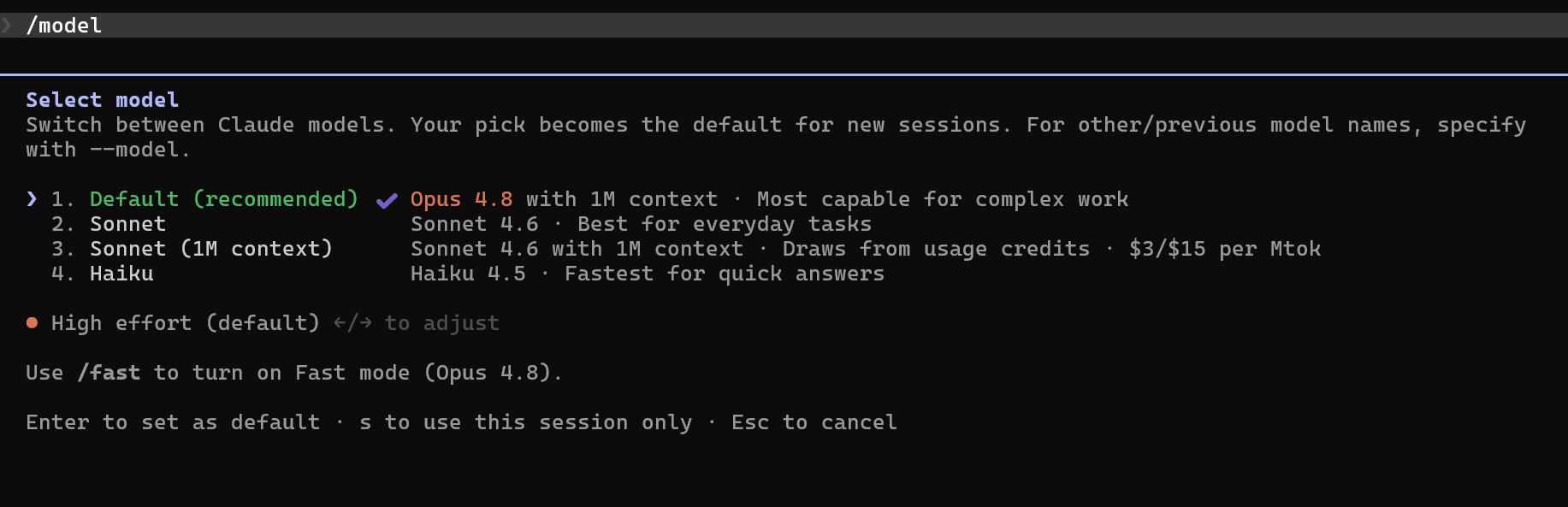
/model picker open in Claude Code showing Haiku, Sonnet, and Opus as selectable optionsWhat is a token, really?
A token is the unit of measurement and the unit of billing. It is roughly three-quarters of an English word.
- “Patient” — one token.
- “Patients” — one token.
- “Pneumocystis jirovecii” — probably four tokens.
- A short Python function — 50 to 150 tokens.
- A typical pathology report — 500 to 2,000 tokens.
- A 200-page PDF — 50,000+ tokens.
The numbers to keep in your head:
- 1,000 tokens ≈ 750 English words ≈ one short printed page.
- A typical Claude Code prompt: 50–200 tokens.
- A typical reply with a small code edit: 500–2,000 tokens.
- A typical file read: 500–5,000 tokens.
🔧 Technical Stuff. Input tokens (what you send) and output tokens (what Claude writes back) are priced differently — output is more expensive per token. Claude Code also re-uses cached portions of your prompt (your
CLAUDE.md, the system instructions) at a steep discount on repeat sends. You don’t manage caching yourself; it happens automatically.
/cost and /stats
Two commands worth memorizing.
/cost — shows what you have spent in this session. You’ll see lines like:
Sonnet: 142,000 tokens in, 18,000 tokens out, $0.83
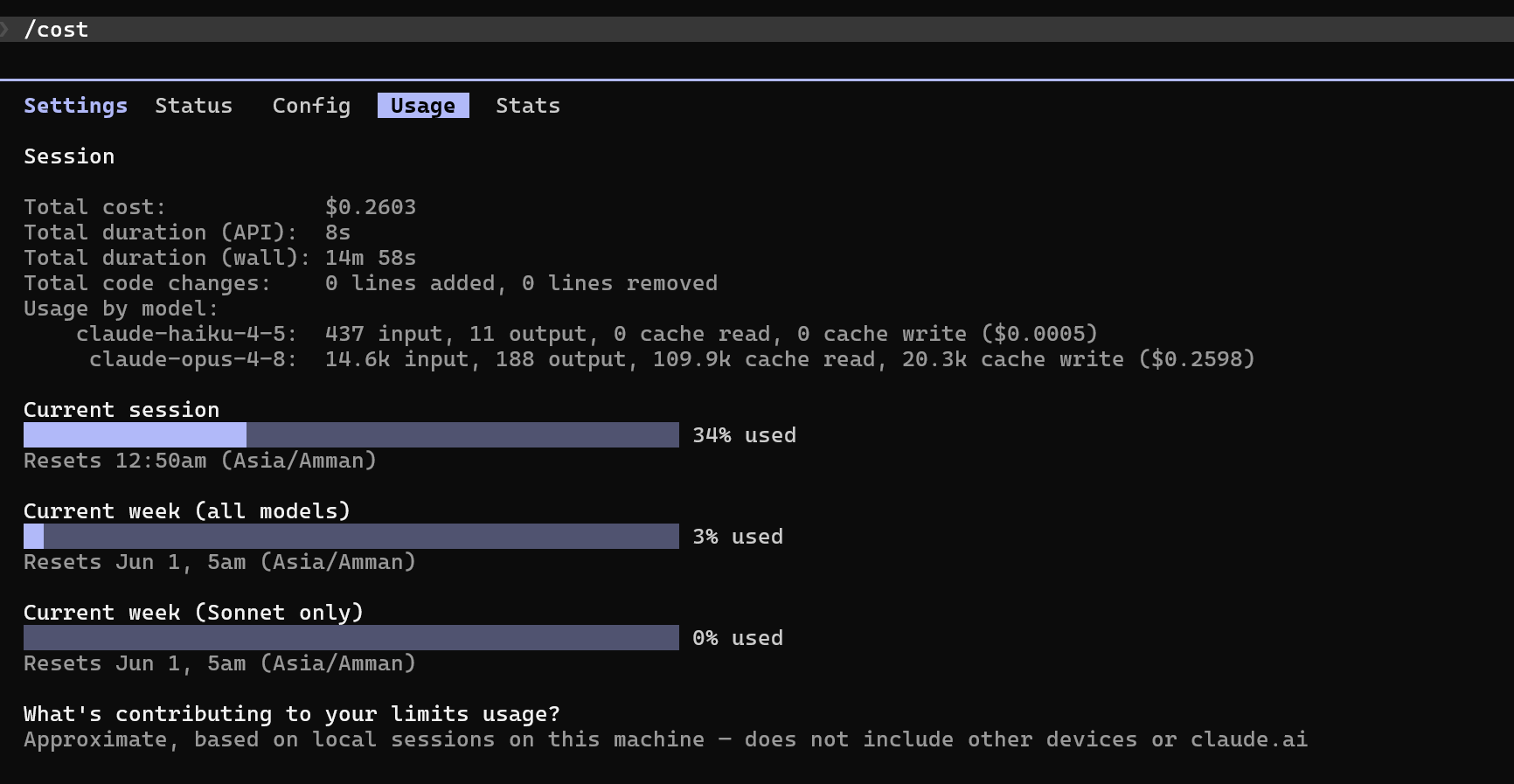
/cost showing dollars spent, tokens used, and a per-model breakdown for the current sessionRun it before and after a task to know what that specific task cost you. On a Pro or Max plan the dollar figure is an estimate of what the usage would have cost — your subscription covers it — but it is still the best gauge of how heavy a task was.
/stats — a richer view. Tokens by model, cache hit rates, input vs. output breakdown, and (depending on the version) a running total across recent sessions.
💡 Tip. Run
/costat the end of each working day for a week. You will quickly learn which tasks cost cents and which cost dollars. After that, you’ll stop worrying about small spend and you’ll have a real sense of when a prompt is about to get expensive.
The three ways to pay
There are three ways to pay for Claude. Pick the one that matches your actual usage.
Claude Pro — $20 per month
Right for the clinician who codes for an hour a day, maybe a few evenings a week. All three models are included. Predictable monthly bill. Rate-limited when you push hard, but it will tell you to slow down rather than surprise you with a bill.
Concrete example. A nurse manager using Claude Code in the evenings to maintain her quality-improvement dashboards — perhaps an hour a day, mostly Sonnet — will fit comfortably inside Pro and never hit a limit.
If you are not yet sure whether Claude Code is for you, this is where to start.
Claude Max — $100 or $200 per month
For people who live inside Claude Code most of the day. The $100 tier is enough for a serious solo developer working full-time. The $200 tier (“Max 20×”) is for the heavy user: multiple sessions running at once, agent teams, big-context refactors, long sessions.
Concrete example. A clinical informatics fellow building out a new extraction pipeline, four hours a day of active work plus a few automated overnight runs, would saturate Pro and should be on Max.
Both Max tiers cover all three models. Both rate-limit you before they bill you.
💡 Tip. If you find yourself doing math like “can I afford to switch to Opus for this prompt?”, you are on the wrong plan. Max exists so you stop counting.
API — pay-as-you-go
This is the one without a subscription. You make an Anthropic API key, Claude Code uses it, and you pay per token used. No monthly fee, no rate limits except the API’s own quotas.
When the API wins:
- Very light use. Two or three sessions a week, mostly Haiku and Sonnet. You may pay $5–20 per month and beat any subscription.
- Background automated jobs. Scheduled overnight extractions, batch processing, the kind of pipelines the AI Office runs at 7am every morning. These don’t benefit from a Max plan’s interactive limits — they want pure per-token billing.
- Team accounts with centralized billing through Anthropic’s console.
When the API loses:
- Daily heavy interactive use. You will sail past $200 per month with no warning. The API has no built-in soft cap.
Concrete monthly examples:
- Clinician dabbling, evenings: Pro at $20.
- Clinician using Claude an hour or two daily: Pro at $20, possibly Max $100 if you hit limits.
- Clinical informatics professional, all day every day: Max $100 or $200.
- Pure overnight pipelines, no interactive use: API key, perhaps $20–50/month depending on volume.
- Mixed: heavy daily interactive plus pipelines: Max $200 for interactive, separate API key (with a spending cap) for the pipelines.
⚠️ Warning. The API gives you no soft warning before it gets expensive. A bug in an automated job — for instance, a script that retries forever — can chew through $100 in an afternoon. Always set a spending cap on the API key in the Anthropic console. Treat the key like a credit card.
Match the model to the task: a KHCC walkthrough
Here is one day of work at the AI Office, with the model choices called out.
Morning. Tuning the Pathology Extraction prompt. You are iterating: tweak the prompt, run it on five reports, look at the outputs, tweak again. Twenty cycles like this. This is Sonnet work. Sonnet is smart enough to give you useful critique on each tweak, and it is cheap enough that twenty cycles costs you cents.
11 AM. A hard SQL problem. The cohort query that pulls patients with multiple admissions in the same week is double-counting some patients, and you have been staring at it for fifteen minutes. Switch to Opus:
/model opus
Paste the query. Ask Opus to find the cause. Five minutes later you have it. Switch back:
/model sonnet
Cheap iteration resumes.
Afternoon. The bulk run. The prompt is stable. You need to run it against 4,000 historical pathology reports for the validation set. This is not an interactive job. You write a small script that calls the Anthropic API directly with Haiku for each report. Haiku is plenty for structured extraction once the prompt is stable. At Haiku prices, 4,000 reports costs you a few dollars instead of several hundred.
Late afternoon. A bulk Press Ganey classification. Tens of thousands of patient comments to classify by domain and sentiment. The Press Ganey Analyzer (Chapter 0.5) is the AI Office pipeline for exactly this. It runs on Haiku — the classification work is structured, the task is repetitive, the volume is huge. Haiku is the right tool.
🧠 Remember. Sonnet for tuning. Opus for hard moments. Haiku for the batch. Three models, three jobs. Don’t pay Opus prices to do Haiku work, and don’t ask Haiku to design your architecture.
“Ultrathink” and the old magic words
A small piece of history. In older versions of Claude Code, you could type words like think, think hard, think harder, or ultrathink in your prompt to nudge the model into thinking longer before answering.
On today’s Sonnet and Opus, extended thinking is on by default — the model decides for itself how long to think based on how hard the question is. But the keywords still work. On a genuinely hard problem, ultrathink on Opus visibly slows the reply by 30 seconds to a couple of minutes and produces noticeably more careful answers.
When to use it:
- A complex refactor plan (we’ll see this in Chapter 9).
- A subtle SQL bug across several queries.
- A schema design where you need to weigh tradeoffs.
When not to use it:
- “Rename this variable.”
ultrathinkhere just costs you money for no benefit.
🔧 Technical Stuff. Thinking tokens are billed like output tokens.
ultrathinkon Opus can mean tens of thousands of extra tokens before the model writes a single visible word. Worth it for the right problem. Wasted on the wrong one.
A word on cost discipline
The numbers in this chapter sound small until they aren’t.
A solo clinician using Claude Code an hour a day on Sonnet might pay $30–50/month on the API — or the same usage covered by a $20 Pro plan.
An AI Office engineer running multiple sessions, Opus for hard tasks, occasional long-context dives, plus a few overnight pipelines, can easily spend $400–800/month on the API and would be much better off on Max 20×.
A misconfigured background job that retries forever can spend $200 overnight. This has happened. It will happen again. Set spending caps.
⚠️ Warning. Two rules. (1) If you use an API key, set a hard spending cap in the Anthropic console. Pick a number that would hurt to lose. (2) If you are spending more than $200/month on the API for interactive work, switch to Max.
Try This
- Run
/costright now in your current session. Note the number. Run it again at end of day. You will be calibrated within a week. - Find the most recent prompt where you felt Claude “didn’t quite get it.” Switch to
/model opus, paste the same prompt withultrathink, and compare. Decide if the better answer was worth the extra cost. - If you have an API key, log into the Anthropic console and set a monthly spending cap. Pick a number that would hurt if you accidentally hit it.
- Try one batch job in Haiku. Pick a task you would normally do in Sonnet (classifying a few hundred lines of free text). Run it once in Sonnet, once in Haiku. Compare both the quality and the cost. Decide for yourself which to use next time.
Watch Out
- Don’t default to Opus for everything. It is a subspecialty consult. Most of your work is general-medicine work.
- Don’t run batch jobs on a Max plan thinking they’re “free.” Max has rate limits. Background jobs will trip them and stall your interactive sessions.
- Don’t use the API without a spending cap. A bug in a loop will out-spend a Max plan in a single afternoon.
- Don’t paste secret API keys or passwords into Claude Code thinking that cost is the problem. Cost is the small problem. The big problem is that the key lands in your transcript and your logs.
- Don’t switch to the 1M-token window just because you can. It costs more, and a bigger room doesn’t help if it’s full of clutter (re-read Chapter 6).