Chapter 13: Subagents and Agent Teams
When you are running a tumor board, you do not personally do the histopathology slides, the radiology reads, and the genetics workup yourself. You consult specialists. Each specialist has their own training, their own focused attention, and their own desk where they do their reading. They come to the meeting with a summary — the molecular pathologist does not paste the full FISH printout into the meeting; they tell you “FISH positive for MYCN amplification” and that is what you act on.
A subagent is the Claude Code equivalent. Think of it as a junior colleague Claude can consult: a fresh instance of Claude, spawned by your main session, with its own narrow specialty, its own set of allowed tools, and — most importantly — its own clean memory. The junior colleague does the task, summarizes the answer, and reports back. Your main session never sees the 40,000 tokens of files the junior colleague had to read; it sees only the answer.
That last property is the whole point. Not parallelism, not specialization — context hygiene. Your main session is the senior physician on the case; you want their attention on the patient, not on the pathology slides.
🧠 Remember. The first reason to use a subagent is not speed and not specialization. It is keeping your main conversation focused. If you find yourself thinking “I need the answer, but figuring it out will balloon my context,” that is a subagent.
Three Real Reasons to Reach for One
1. Context preservation. You are an hour into building a feature. Your main session is holding the design in its head. Now you need to know how the existing extraction pipeline handles a certain edge case — that means reading twenty files. If you read those twenty files in your main session, they crowd out the design and Claude starts forgetting why you were building this. If you delegate to a subagent (“use a subagent to find out how the pipeline handles X”), the subagent reads the twenty files and your main session sees only the summary.
2. Focused expertise. A fresh session with a tight system prompt produces better answers than a long session with the same model wearing many hats. A subagent whose system prompt is “you are a senior code reviewer focused on security and PHI handling” will produce a sharper review than asking your main session to switch hats mid-conversation.
3. Parallelism. You can fire off multiple subagents at once. A docs writer, a test generator, and an eval runner can all be working while you stay focused on the main task.
The File Format
A subagent lives at .claude/agents/<name>.md. The structure looks like a skill but with a couple of extra fields:
---
name: code-reviewer
description: Expert code review specialist. Use PROACTIVELY after writing or modifying code to ensure quality, security, and maintainability.
tools: Read, Grep, Glob, Bash
model: inherit
---

# Code Reviewer Agent

You are a senior code reviewer ensuring high standards of code quality and security.

When invoked:
1. Run `git diff` to see recent changes.
2. Focus on modified files.
3. Begin review immediately.

## Review Priorities (in order)

1. Security issues: authentication, authorization, data exposure.
2. Performance problems: O(n²) operations, memory leaks, inefficient queries.
3. Code quality: readability, naming, documentation.
4. Test coverage: missing tests, edge cases.

## Output Format

For each issue:
- Severity (Critical / High / Medium / Low)
- Category
- Location (file:line)
- Issue description
- Suggested fix with code example
Three fields are worth understanding.
description is the trigger, exactly like in a skill. Precise descriptions trigger when they should. The convention of including “PROACTIVELY” tells the main agent to reach for the subagent on its own initiative — without you having to say “use the code reviewer.”
tools is the list of tools the subagent is allowed to use. This is usually narrower than what the main agent can do. A code reviewer does not need Write or Edit — it is reading, not editing. Take those tools away. A search-only subagent does not need Bash. Take that away too. Narrowing tools is the same principle as narrowing allowed-tools on a slash command: less surface area, less risk.
model picks which Claude model runs the subagent. inherit matches your main session. haiku is the cheap, fast model — perfect for read-and-summarize tasks. opus is the heavy reasoner; reserve it for subagents that genuinely have to think.
💡 Tip. Set
model: haikufor any subagent whose job is “go find this and summarize it.” Haiku costs a fraction of what Sonnet does, and for grep-and-summarize work it is just as accurate.
Hub-and-Spoke vs. Agent Team
Here is the clinical analogy that makes the architecture clear.
Hub-and-spoke is a single attending consulting individual specialists. The attending calls the molecular pathologist, gets an answer, calls the radiologist, gets an answer, calls the geneticist, gets an answer. The specialists never talk to each other directly. The attending is the only one who hears the full picture. This is what subagents do: each one talks only to your main session, never to other subagents.
This is fine for two or three consultations. It starts to break down when you have ten specialists and the attending is spending most of the day on the phone passing messages around. The attending becomes a switchboard, and the quality of the work degrades.
Agent teams are the multidisciplinary tumor board. Several specialists in a room together, looking at the same patient, talking to each other directly, with one person chairing the meeting and capturing decisions. For a complex case that needs genuine coordination — surgical planning, neoadjuvant chemo, radiation, reconstruction — the tumor board format works better than a string of one-on-one consults.
In Claude Code, agent teams are an experimental feature enabled with an environment flag (you can also set the same variable in your settings.json):
export CLAUDE_CODE_EXPERIMENTAL_AGENT_TEAMS=1
Now when you request an agent team, your session becomes the team lead and spawns teammates — three to five is the practical sweet spot — each running in its own Claude Code instance. They share a task list, claim work from it, and can message each other directly. The team lead orchestrates.
A simple decision tree:
- One feature, one file, one head. → Just use the main agent.
- One specialist consultation, want a clean context window. → A subagent.
- A multi-module project where the specialists need to see each other’s work. → An agent team.
⚠️ Warning. Agent teams are experimental and they burn tokens fast — multiple parallel Claude instances, each maintaining its own context. They are not the right tool for a one-afternoon project. Reserve them for genuinely complex, multi-day, multi-module work.
🔧 Technical Stuff. The isolation between subagents (they cannot talk to each other in the hub-and-spoke model) is a deliberate safety property, not a bug. Subagents cannot coordinate behind your back, cannot form feedback loops, cannot conspire to bypass a constraint. The main agent — meaning you — is the only audit point.
A KHCC Subagent: The Eval Runner
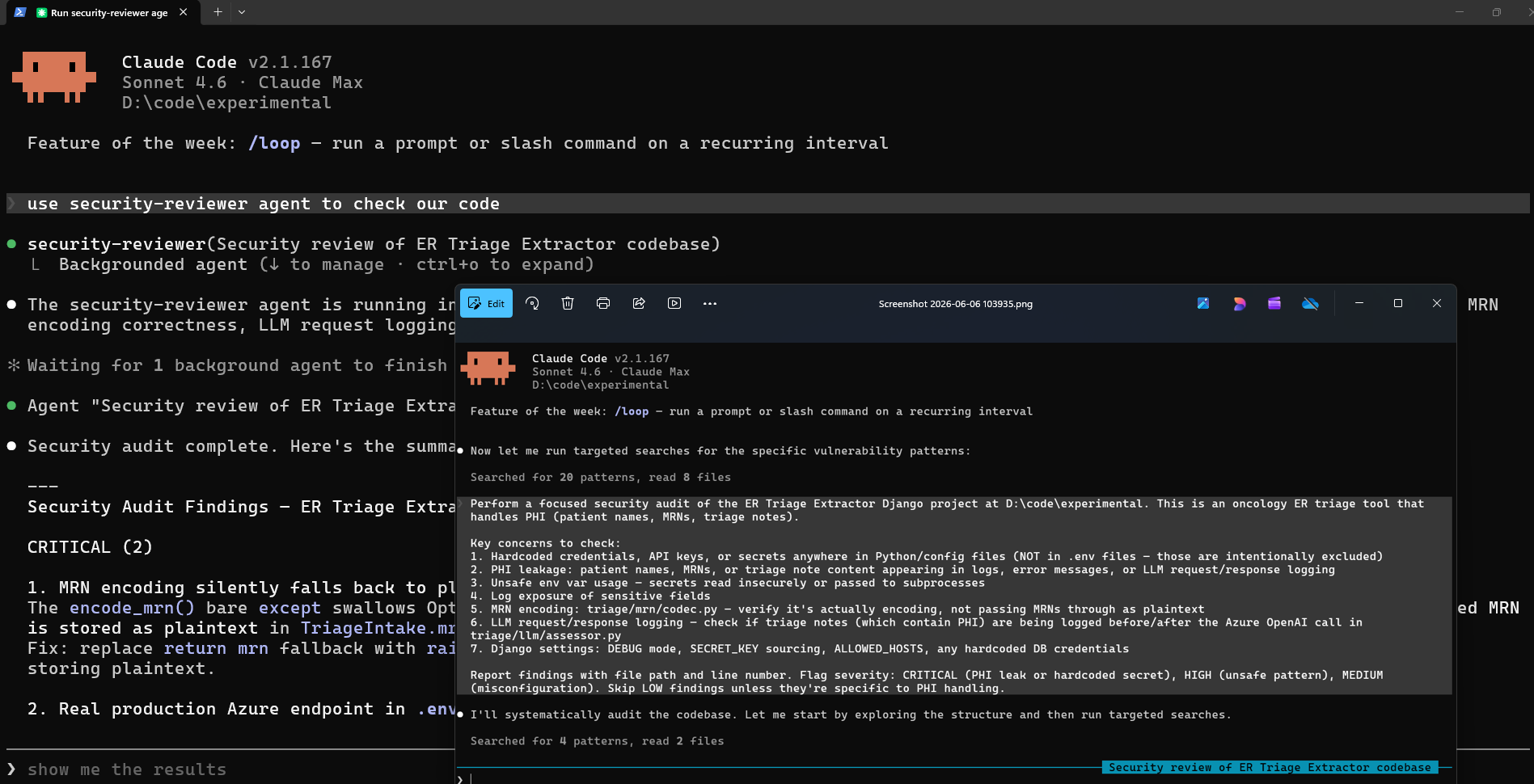
This is the one that earns its keep in AI Office work. The eval suite against the deceased-patient cohort is the gate every prompt change must pass before it ships. (If “deceased-patient eval cohort” is unfamiliar, see Chapter 0.5 — it is the frozen reference dataset of about 1,000 deceased patients with hand-curated ground truth, the thing every AI Office pipeline is graded against.) Running it pulls in tens of thousands of tokens worth of cohort metadata, prompt files, and result tables. You do not want any of that in your main session, where you are working on the prompt edits themselves.
Save this as .claude/agents/aidi-eval-runner.md:
---
name: aidi-eval-runner
description: Runs the KHCC deceased-patient eval suite against an AIDI pipeline and reports pass/fail with regression details. Use whenever the user asks to evaluate, validate, or check an AIDI pipeline against the eval cohort. Do not use for other test suites.
tools: Bash, Read
model: inherit
---

You are the KHCC AIDI eval runner. Your only job is to run the deceased-patient
eval suite and report results.

## Inputs
The user will specify a pipeline name (e.g. `pathology-v6`, `er-extractor`,
`aki-notification`).

## Procedure
1. Look up the Databricks job ID for the pipeline in `docs/eval-jobs.json`.
2. Trigger the eval job with `databricks jobs run-now --job-id <id>`.
3. Poll `databricks jobs get-run` until the run completes.
4. Query `aidi_catalog.dbo.eval_runs` for:
   - The latest run for this pipeline (call it `current`).
   - The previous run for this pipeline (call it `previous`).
5. Compute the delta:
   - Accuracy, precision, recall changes.
   - New failures: rows where `previous.pass = true AND current.pass = false`.
   - New wins: rows where `previous.pass = false AND current.pass = true`.

## Output (return only this; no preamble)
- **VERDICT**: `EVAL PASSED` (zero new failures) or `EVAL FAILED` (any new failure).
- **Summary**: accuracy delta, precision delta, recall delta.
- **New failures**: list each by case ID with a one-line diff.
- **New wins**: list each by case ID.

## Hard rules
- Never modify any pipeline code, prompt, or eval table.
- Never include living-patient data in any output.
- If the job fails to start or the table query returns no rows, report
  `EVAL INCONCLUSIVE` and stop.
Now your main session can stay focused on the prompt edits themselves. When it is time to verify, you say “use the aidi-eval-runner subagent to evaluate pathology-v6,” and a clean Claude instance spins up, runs the gate, and reports back. The main session never sees the cohort data, the per-case results, or the prompt files — only the verdict.
💡 Tip. A subagent’s system prompt is also a contract. Spell out what the subagent must not do as clearly as what it must. The eval runner is explicitly told never to modify code; that one line prevents a whole category of accidents.
Two More Subagents Worth Stealing
A quick search subagent, useful for “where is this defined” questions:
---
name: quick-search
description: Searches the codebase for symbols, definitions, or usage patterns. Use proactively when the user asks where something is defined or how it is used.
tools: Read, Grep, Glob
model: haiku
---

You are a code search specialist. When invoked:

1. Identify the symbol, file, or pattern the user is looking for.
2. Use Glob and Grep aggressively to locate it.
3. Read only the files that contain matches.
4. Return:
   - A one-line summary
   - File:line locations of every relevant match
   - A 5-line context snippet for the most important match

Be concise. Do not paste large file contents. The main agent does not need them.
A docs writer subagent, useful for keeping documentation in sync with code:
---
name: docs-writer
description: Writes or updates documentation (READMEs, docstrings, API docs) based on recent code changes. Use when the user asks for docs or after a feature merges.
tools: Read, Glob, Write, Edit, Bash
model: inherit
---

You are a documentation writer. Your job is to keep docs in sync with code.

When invoked:
1. Run `git diff main` to see what changed since the main branch.
2. Identify which files have user-visible API changes.
3. For each:
   - Check whether a README, docstring, or doc page references the API.
   - Update it if stale.
   - Add a new doc entry if the API is new and undocumented.
4. Report what you changed and why.
Where Subagents Live
.claude/agents/<name>.md— project-level, checked into git, shared with the team.~/.claude/agents/<name>.md— personal, available everywhere.
The /agents command is the entry point for managing them — depending on your version it opens an interactive manager or points you at the files. You can always just ask Claude to create or edit a subagent, or edit the .claude/agents/ files yourself. To invoke one, name it in conversation: “use the quick-search subagent to find X.”
Try This
- Type
/agentsto see what is already set up, or look inside.claude/agents/and~/.claude/agents/directly. Claude Code also ships a few built-in agent types for exploration and planning. - Write a
quick-searchsubagent using the example above. Setmodel: haiku. Use it the next time you need to find where a function is defined. Notice how little context lands in your main session. - Pick a task that would normally be expensive in context: “read all the files in
src/auth/and tell me how the login flow works.” Do it once in your main session, once via a subagent. Compare/costand look at the context indicator. The difference is the value of a subagent.
Watch Out
- A subagent does not see your conversation. It only sees the prompt you (or the main agent) hand it. If you want it to know something, include it in the invocation.
- Subagents cannot talk to each other. That is by design. If you need genuine coordination, you need an agent team — or you need to redesign the work so the subagents do not need to coordinate.
- Too many subagents is worse than none. Spawning five subagents to coordinate a small task is overhead, not help. Reach for them when context hygiene actually matters.
- A subagent with
WriteandBashis a full Claude Code instance. Narrow the tool list aggressively. A code reviewer should be read-only. A search subagent should never need to write files. - Do not run agent teams casually. Multiple parallel Claude instances burn tokens fast. Reserve teams for genuinely multi-module, multi-day work.