Chapter 14: Hooks
Everything we have covered in this part of the book — CLAUDE.md, slash commands, skills, subagents — depends on Claude choosing to follow your rules. The model reads the file, the model reads the description, the model is well-behaved most of the time. Most of the time is not all of the time. Hooks are what you reach for when “most of the time” is not good enough.
The clinical analogy is the EMR’s automatic-action rules. When a chemotherapy order for Cisplatin is signed, the EMR does not advise the physician to check the creatinine. It fires an alert automatically, every time, whether the physician wants it or not. The hard-stop is built into the workflow at the system level. The physician cannot accidentally bypass it by being in a hurry.
A hook is the Claude Code version of that hard-stop. It is a small shell command — a few lines of code on your computer — that Claude Code runs automatically at a specific moment in its lifecycle. The hook does not ask Claude for permission. It is not advice the model can ignore. It is plumbing. It always fires. It costs zero tokens.
The principle to keep in mind: CLAUDE.md is for suggestions. Hooks are for requirements.
🧠 Remember. Hooks always run. There is no “Claude decided not to” with a hook. If the hook is configured, it fires, every time, no exceptions. That is exactly why they are the right tool for non-negotiable rules.
The Lifecycle Events That Matter
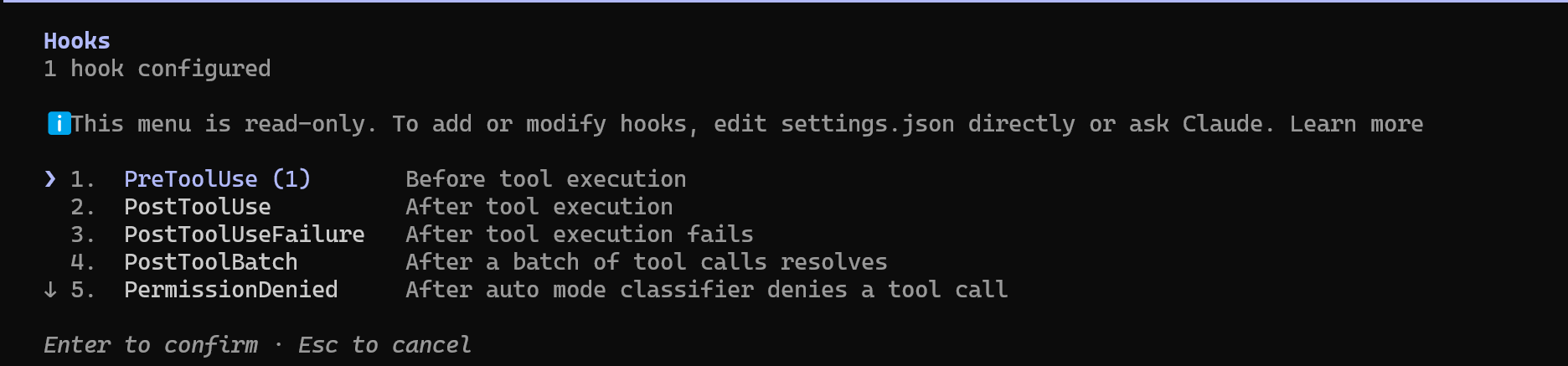
There are several moments in a Claude Code session where a hook can attach. The four that matter most for daily work:
PreToolUsefires before Claude is allowed to use a tool — running a shell command, editing a file, writing a new file. The hook can inspect what Claude is about to do and refuse it. This is your safety hard-stop. Clinical analogy: the EMR refusing to sign a chemo order when creatinine is below threshold.PostToolUsefires after a tool completes. It cannot block the action (it already happened) but it can react — format the file Claude just edited, run a linter, log the change, send a notification. Clinical analogy: the EMR auto-populating a follow-up order set after a procedure is signed.Stopfires when Claude finishes its turn and is about to return control to you. We will use this in Chapter 18 to build overnight automation; for now, just know it exists.SessionStart/SessionEndfire at the bookends of a session. Good for logging, setting environment variables, or printing a daily reminder. Clinical analogy: the morning huddle and the end-of-shift sign-out.
Where Hooks Live
Hooks are configured in .claude/settings.json under the "hooks" key. Here is a minimal example that runs Prettier (a code formatter) on every file Claude edits or writes:
{
  "hooks": {
    "PostToolUse": [
      {
        "matcher": "Edit|Write",
        "hooks": [
          {
            "type": "command",
            "command": "npx prettier --write \"$(jq -r '.tool_input.file_path')\" 2>/dev/null || true"
          }
        ]
      }
    ]
  }
}
The three pieces are:
PostToolUse— the lifecycle event. The hook fires after Claude uses a tool.matcher— matched against the tool name.Edit|Writemeans “any time Claude edits a file or writes a new one.” UseBashto match shell commands;*matches every tool.command— the actual shell command to run. When the hook fires, Claude Code hands the command a small JSON packet on its standard input describing what just happened — which tool ran, and with what inputs. Thejq -r '.tool_input.file_path'fragment pulls the edited file’s path out of that packet (jqis a small command-line tool for extracting fields from JSON;brew install jqif your system lacks it), and Prettier formats that file.
🔧 Technical Stuff. Every hook receives the same kind of JSON packet on standard input: the session ID, the event name, the tool name, and a
tool_inputobject whose fields depend on the tool.EditandWritegive you.tool_input.file_path;Bashgives you.tool_input.command. The full schema is in the Claude Code hooks documentation; when in doubt, write a hook that just runscat > /tmp/hook-input.jsonand inspect what arrives.
Example 1: Auto-Format After Every Edit
The Prettier hook above is the canonical example. It is the equivalent of an order-set template that always formats the order the right way — every time Claude edits a file, the file gets formatted before you ever look at it. You will never again ask Claude to “remember to run the formatter.”
The same idea works for Python:
{
  "type": "command",
  "command": "FILE=$(jq -r '.tool_input.file_path'); ruff format \"$FILE\" 2>/dev/null; ruff check --fix \"$FILE\" 2>/dev/null || true"
}
And for R:
{
  "type": "command",
  "command": "FILE=$(jq -r '.tool_input.file_path'); Rscript -e \"styler::style_file('$FILE')\" 2>/dev/null || true"
}
The || true at the end keeps a formatter hiccup from being reported as a hook error when the file type is not one it recognizes. The 2>/dev/null hides the noise.
💡 Tip. You can stack multiple
PostToolUsehooks. The matcher is against the tool name, not the file name. If you want different behavior for.pyvs..Rfiles, filter inside the command itself using shellcasesyntax.
Example 2: Block Destructive Commands (The Patient-Safety Hard-Stop)
This is the other side of the safety net, and it is the clearest hook analogy to a clinical hard-stop. A PreToolUse hook can inspect every shell command Claude is about to run and refuse the dangerous ones:
{
  "hooks": {
    "PreToolUse": [
      {
        "matcher": "Bash",
        "hooks": [
          {
            "type": "command",
            "command": "CMD=$(jq -r '.tool_input.command'); if echo \"$CMD\" | grep -qE '(rm\\s+-rf\\s+/|DROP\\s+TABLE|TRUNCATE|DELETE\\s+FROM.*WHERE\\s+1\\s*=\\s*1)'; then echo 'BLOCKED: destructive command' >&2; exit 2; fi"
          }
        ]
      }
    ]
  }
}
The hook reads the command Claude is about to run from the JSON packet on its standard input. If the regex matches a known-destructive pattern (rm -rf /, DROP TABLE, TRUNCATE, a DELETE with no real WHERE clause), the hook exits with status 2 — the exit code Claude Code treats as “block” — and the command never runs. Whatever the hook printed to stderr is fed back to Claude, which sees the rejection and is forced to try a different approach. (Exit code 0 means allow; any other non-zero code is reported as a hook error rather than a block, so the 2 matters.)
This is the patient-safety equivalent of the EMR’s hard-stops. The doctor cannot order vincristine intrathecally because the EMR refuses to let the order through, no matter what. The same idea: even if Claude decides creatively that rm -rf is the right answer to a question, the hook stops it before any damage is done.
⚠️ Warning. A hook is only as good as its regex. The example above catches
rm -rf /but does not catchrm -rf $HOMEorrm -rf ~. Write your blocklist against your worst-case scenarios. And remember: a hook is a tripwire, not a fortress. A creative path around it (find / -delete, for instance) will not match the regex. Layer hooks with permission settings and the/sandboxcommand when the stakes are real.
Example 3: Log Every Edit
In a regulated environment, knowing exactly what Claude touched and when is part of the audit trail. A simple hook records it:
{
  "hooks": {
    "PostToolUse": [
      {
        "matcher": "Edit|Write",
        "hooks": [
          {
            "type": "command",
            "command": "echo \"$(date -u +%Y-%m-%dT%H:%M:%SZ) $(jq -r '.tool_input.file_path')\" >> .claude/edit-log.txt"
          }
        ]
      }
    ]
  }
}
Every file Claude touches is recorded with a UTC timestamp. No prompt engineering, no token cost. Just a log file you can tail when you need to know what happened.
A KHCC Hook: Protect the Eval Cohort
This is the hook worth writing today, for any AI Office repository.
The eval results table — aidi_catalog.dbo.eval_runs — is the unified table where every evaluation run for every AI Office pipeline gets recorded. Each row is one run of one pipeline against the deceased-patient cohort, with the resulting accuracy, precision, recall, and per-case pass/fail flags. It is append-only by convention; nothing is ever supposed to update or delete a row. The whole eval discipline depends on this. If a non-eval session — say, a clinician exploring AKI cases who typos a filter in an UPDATE statement — accidentally writes to the table, the baseline is corrupted, and every future regression check is silently wrong. That is the single worst failure mode for a clinical AI eval suite.
A PreToolUse hook can make it impossible:
{
  "hooks": {
    "PreToolUse": [
      {
        "matcher": "Bash",
        "hooks": [
          {
            "type": "command",
            "command": "CMD=$(jq -r '.tool_input.command'); if echo \"$CMD\" | grep -qE 'aidi_catalog\\.dbo\\.eval_runs'; then if [ \"$AIDI_EVAL_SESSION\" != \"1\" ]; then echo 'BLOCKED: eval_runs touched from non-eval session. Set AIDI_EVAL_SESSION=1 to override.' >&2; exit 2; fi; fi"
          }
        ]
      }
    ]
  }
}
What this does, step by step:
- Before any shell command runs, read the command from the hook’s standard input and inspect it for the string
aidi_catalog.dbo.eval_runs. - If the table name appears in the command, check whether the environment variable
AIDI_EVAL_SESSIONis set to1. - If it is not set, exit with code 2 — refusing the command and feeding Claude a clear error message that explains how to override.
Now an analyst exploring AKI cases cannot accidentally UPDATE the eval table because they typoed a WHERE clause. The automation script that is supposed to write to eval_runs sets the environment variable up front and proceeds normally. The hook is invisible when behavior is correct, and a hard-stop when it is not.
Pair this with the aidi-eval-runner subagent from Chapter 13: the subagent sets AIDI_EVAL_SESSION=1 before doing its work and is the only sanctioned path through which the eval table changes. Defense in depth — the subagent is the policy, the hook is the enforcement.
💡 Tip. Pair every hook with an explicit override mechanism (an environment variable, a flag file) rather than making it absolutely unconditional. Unconditional hooks frustrate users into disabling them, which is worse than no hook at all. A clear, deliberate override path keeps the hook on permanently while still permitting authorized work.
When to Reach for a Hook vs. a Rule
A simple framing:
- Use a rule in
CLAUDE.mdfor things Claude can reasonably be expected to follow voluntarily, where the cost of a slip is “minor annoyance” — coding style, naming conventions, which model to default to. - Use a hook for things where a slip is costly, irreversible, or invisible. Auto-formatting (because catching unformatted code in review wastes time). Destructive-command blocking (because
rm -rfdoes not have an undo). Audit logging (because you cannot fake what was not recorded). Eval-table protection (because a corrupted baseline silently hides every future regression).
⚠️ Warning. Do not put every rule in a hook. Hooks are powerful, but they are also noisy, and they run with your shell’s permissions. A project with twenty hooks is harder to debug than a project with three. Reserve them for the non-negotiables; everything else stays in
CLAUDE.md.
Where Settings Live
.claude/settings.json— project-level, checked into git, shared with the team. Use this for hooks the whole team needs (the destructive-command blocker, the eval-table protector)..claude/settings.local.json— project-level but gitignored. Your personal additions for this project, not shared with the team.~/.claude/settings.json— user-level, applies everywhere. Use sparingly.
Hooks compose across the three: a user-level hook fires in every project, a project-level hook fires only in that project, and a local file lets one developer add experimental hooks without inflicting them on the team. Type /hooks inside a session to see every configured hook and where each one came from.
Try This
- Open
.claude/settings.json(create it if it does not exist). Add the auto-format hook for the language your project uses. Ask Claude to edit a file. Watch the formatting happen without you mentioning it. - Add the destructive-command blocker. Then deliberately ask Claude to
rm -rfsomething benign in a sandbox folder. Confirm the hook blocks it and read the rejection message. - Add the audit log hook. Work for an hour. Then look at
.claude/edit-log.txtand see exactly what got touched.
Watch Out
- A bad hook can wedge your whole session. A
PreToolUsehook that always exits with code 2 will block every action, and one that crashes on every packet buries you in error noise. If Claude seems frozen, check your hooks first. - Hooks run with your shell’s permissions. There is no sandbox. Do not write a hook that does anything you would not be comfortable running yourself.
- Regex blocklists leak. A blocklist for
rm -rf /is bypassed bycd /; rm -rf .. Treat the blocklist as a tripwire, not a fortress. For genuinely high-stakes work, layer with/permissionsand/sandbox. Stophooks can loop forever. If yourStophook always prints something, Claude never actually stops. Always include a termination condition: an empty TODO list, a max-iterations counter, a time-of-day cutoff. We will treat this carefully in Chapter 18.- Do not leak secrets through hooks. If your hook reads
$AZURE_OPENAI_KEYor any other credential, do not echo it to stdout, do not pipe it into a log file, do not let it end up in.claude/edit-log.txt. Hooks see whatever your shell sees.