Chapter 10: CLAUDE.md — Your Project Instruction Manual
Every clinical service has an unwritten rulebook. The pharmacy resident who rotates onto oncology learns, in her first week, that vancomycin troughs at KHCC go through the TDM module, that chemo doses get a second pharmacist check no matter what the EMR says, and that nobody — nobody — orders cisplatin without confirming today’s creatinine. None of that is in a textbook. It is the culture of the service.
Claude Code arrives in your project with no such culture. It knows Python and SQL the way the resident knows pharmacology. It does not know your hospital’s conventions, your tables’ names, or the rules you have learned the hard way. CLAUDE.md is the document you hand it on day one so it stops guessing.
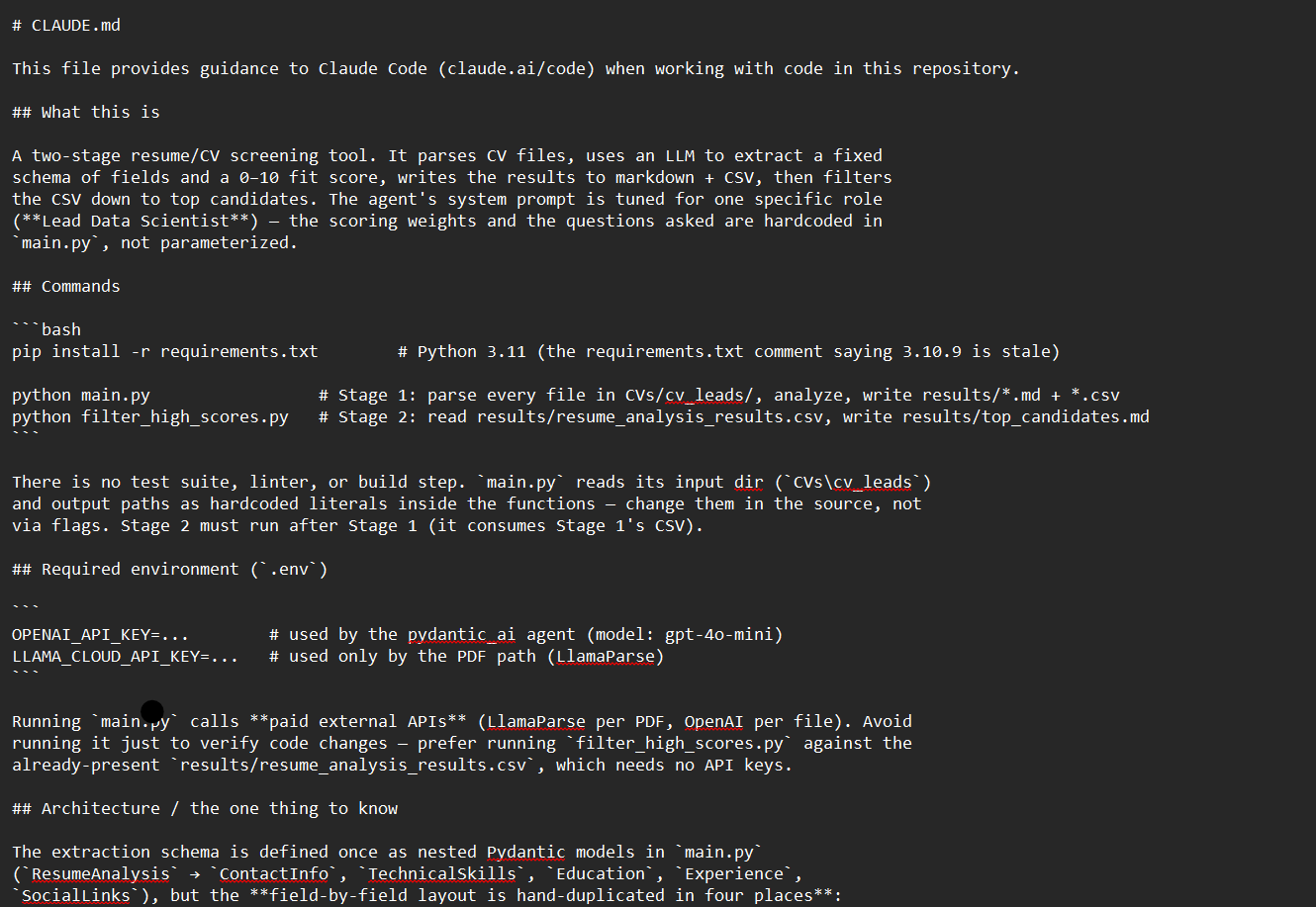
Think of CLAUDE.md as the order-set template the pharmacy hands every new resident — “here is how we do things on this service.” Claude reads it before every session, before every question, before it looks at a single line of code. Whatever you put in there frames every decision it makes for the rest of the conversation.
🧠 Remember.
CLAUDE.mdis not a README. A README is written for humans who arrive at your project.CLAUDE.mdis written for Claude, and it is consumed before every single turn. Different audience, different rules.
Where the File Lives, and Why There Are Three of Them
When Claude Code starts up inside a project folder, it looks in three places for CLAUDE.md files, in this order:
- Personal —
~/.claude/CLAUDE.md. This is your private global file. It applies to every project you open on your laptop. Good for things like “I always useuvinstead ofpip” or “when I ask for a citation, prefer Vancouver style.” It is your layer, not the team’s. - Project —
./CLAUDE.mdat the project root. This is the team’s shared file. It gets checked into git so every collaborator gets the same context. The KHCC AI Office repositories live or die by this file. - Folder-specific — a
CLAUDE.mdinside a subfolder. This one applies only when Claude is working in that subfolder. Useful when one corner of the project has its own rules — say,notebooks/extraction/CLAUDE.mddescribing the PydanticAI extraction pattern that only applies inside the extraction pipeline.
The personal and project files are read the moment a session starts; folder-specific files join in when Claude works inside their folders. (There is a fourth, less common layer: CLAUDE.local.md, a personal project-specific file that stays out of git — useful for private notes that apply only to this project on your laptop.) Everything that loads becomes part of the instructions Claude sees on every turn. That is powerful. It also means every line you write here is spending attention from a finite budget — the same budget Claude needs for your actual question.
Step One: Run /init, Then Delete Half of It
The fastest way to get a starter CLAUDE.md is to type /init inside Claude Code. (A slash command, which we will cover properly in Chapter 11, is just a shortcut you type starting with /.) /init looks around your project, figures out what it is — a Python project, a Django app, an R analysis, a Databricks notebook collection — and writes a starter file describing the stack, the package manager, the test command, the directory layout.
Now read every line of what it wrote. Out loud, if you can. For each line, ask yourself a single question:
“Would Claude make a mistake without this line?”
If the answer is no, delete the line. If the answer is “probably not, but it’s nice context,” delete the line. /init is generous. It produces a 200-line file when 40 would do. Most of what it generates is information Claude can figure out by looking at the files themselves — your package.json already tells it you use npm, so writing “we use npm” in CLAUDE.md is a wasted token.
💡 Tip. Run
/init, commit the generated file as-is, then cut it in half on a second commit. The diff between the two commits is a useful record of what actually mattered in your project’s conventions.
The Instruction Budget
There is a soft ceiling here that experienced teams have learned the hard way: somewhere around 150–200 instructions, Claude starts following individual rules less reliably. Not because it stops being able to see them — they are still there — but because attention is finite. The 150th bullet about indentation style competes for attention with the one rule you actually needed Claude to follow: never log MRNs in plaintext.
Treat the file like a drug formulary: every entry has to earn its place. If your CLAUDE.md is creeping toward 300 lines, the first question is not “should we add the next rule” but “which of these can move into a hook or a skill” (Chapters 12 and 14).
⚠️ Warning. A bloated
CLAUDE.mddoes not just cost tokens. It quietly degrades adherence to the rules you actually need. The rule that catches an MRN leak is now competing with 40 lines about your preferred indentation. More is not better.
The Habit That Compounds: Update After Every Mistake
This is the single highest-return habit in Claude Code. Every time Claude makes a mistake — picks the wrong table, forgets to encode an MRN, uses pip when your project uses uv, queries aidi_catalog.dbo.eval_runs outside an eval session — say:
“Update
CLAUDE.mdso this does not happen again.”
Claude will append a line. Over the course of weeks, your CLAUDE.md becomes a living record of every lesson the team has learned. The bugs you have already paid for stop being bugs you pay for twice. A six-month-old CLAUDE.md for an actively developed project should look noticeably different from the day-one version; if it does not, either nobody is catching mistakes or nobody is feeding the lessons back into the file.
🧠 Remember. A static
CLAUDE.mdon a living project is a smell. The file should grow as the team learns.
The 12 Rules, Translated for Clinicians
The KHCC AI Office repositories carry a set of twelve rules adapted from Andrej Karpathy and from a developer named Mnilax who tested them across 30 codebases. They are useful, but a clinician reading them cold will not see why each one matters. Let me walk through them in clinical language.
- Think before coding. Surface assumptions before you write code. If a clinical definition is ambiguous (“bone-only metastatic” — does that include lung mets that resolved?), ask. Do not guess.
- Simplicity first. Write the minimum code that solves the problem. No features beyond what was asked. The pipeline you build in a hurry is the pipeline you maintain forever.
- Surgical changes. Touch only what you must. Do not “improve” the adjacent function. The AKI pipeline is in production; do not refactor it just because you noticed something while passing by.
- Goal-driven execution. Define what “done” looks like before you start. For an extraction change, “done” means the eval suite passes against the deceased-patient cohort. Loop until that gate is green.
- Use the model only for judgment calls. Use the LLM for things that need language understanding — pathology free text, clinic notes, ER triage prose. Do not use it for KDIGO staging (that is arithmetic), for MRN encoding (that is a function), or for status-code handling (that is a regex).
- Token budgets are not advisory. Each task has a budget. If you are approaching it, summarize and start fresh — do not push through.
- Surface conflicts, do not average them. If two existing patterns in the codebase disagree (one uses median baseline creatinine, another uses minimum), pick the better one, explain why, and flag the other for cleanup. Code that satisfies both contradictory rules at once is the worst possible outcome.
- Read before you write. Before adding code to a file, read what is already there. Read the file that calls into it. Read the shared utilities it depends on. “Looks orthogonal to me” is the most dangerous phrase a clinician-turned-coder can think.
- Tests verify intent, not behavior. An eval case must encode why the behavior matters, not just what it does. “Pathology extraction returns a string” is worthless. “Pathology extraction correctly identifies T2N1M0 in this known case” is the real test.
- Checkpoint after every step. Multi-phase work — Phase 1: cohort SQL → Phase 2: LLM extraction → Phase 3: analysis — should checkpoint between phases. Confirm row counts and sample MRNs before moving on. Do not run Phase 2 against a Phase 1 output you have not validated.
- Match the codebase’s conventions. Even if you disagree. If the AI Office notebooks use one pattern and you would prefer another, raise it as a separate conversation; do not silently fork.
- Fail loud. Silent failures are the most dangerous failure mode in clinical pipelines. A patient missing from the AKI alert run because of a join error is worse than the pipeline crashing. Log every skipped row, every null field, every parse failure. Surface uncertainty rather than hiding it.
A Real KHCC CLAUDE.md, Annotated
Here is a starter CLAUDE.md for an AI Office clinical AI repository, with annotations explaining each section. Use it as a template; cut it down to fit your actual project.
# KHCC AIDI Pipeline — CLAUDE.md

## Stack
- Databricks notebooks (PySpark + Python cells).
- Azure OpenAI `gpt-4.1-mini` is the default model. PydanticAI for structured extraction.
- R: tidymodels, finalfit, gtsummary, survminer (Lancet theming).
- Unity Catalog: `aidi_catalog`. Azure SQL: `AIDI-DB`.
This block tells Claude what tools to reach for. Without it, Claude might suggest plain OpenAI SDK code when the team has standardized on PydanticAI, or default to ggplot themes when the team uses Lancet styling.
## Patient data — non-negotiable
- Never log MRNs or names in plaintext.
- MRNs: Optimus-encode before any output (email, dashboard, log).
- Names: Fernet-encrypt before storage.
- Eval cohorts use the frozen deceased-patient set in `aidi_catalog.dbo.eval_cohort`.
  Never include living patients in shared eval data.
This is the PHI section. Optimus encoding scrambles an MRN into a reversible-but-not-human-readable identifier — so if MRN 12345 ends up in an email log, what is actually there is a token that the system can decode internally but a human reading the log cannot. Fernet is symmetric encryption for patient names: names go into storage encrypted and only get decrypted at the moment a clinician needs to read them. Together, the two mean that an output leaving the secure perimeter (an email, a dashboard, a CSV export) never contains plaintext identifiers. (Both were introduced in Chapter 0.5.)
## Eval gate
- No prompt or extraction change ships without an eval run on the deceased-patient cohort.
- Results table: `aidi_catalog.dbo.eval_runs`. Append-only. Never overwrite.
The eval suite is the verification gate that separates the AI Office from less rigorous AI work. Every prompt change, every extraction-logic change, runs against the same 1,000 deceased patients with hand-curated ground truth, and the diffs are reviewed before anything ships. This block tells Claude that the eval is the test.
## The 12 rules (Karpathy + Mnilax)
1. Think before coding.
2. Simplicity first.
3. Surgical changes.
4. Goal-driven execution.
5. Use the model only for judgment calls.
6. Token budgets are not advisory.
7. Surface conflicts, don't average them.
8. Read before you write.
9. Tests verify intent, not behavior.
10. Checkpoint after every significant step.
11. Match the codebase's conventions.
12. Fail loud.
We walked through these above. They live in the CLAUDE.md because they apply to every interaction; longer pipeline-specific patterns get pushed out into imported files (next section).
## Conventions
- Extraction pipelines: read docs/aidi-extractions.md before touching extraction code.
- Email: read docs/email-pattern.md for the `DoNotReply@khcc.jo` sender pattern.
- Commit messages: `type(scope): subject`. Scope = pipeline name.
A plain-text pointer like this keeps the main CLAUDE.md lean: Claude reads the referenced file only when the task actually calls for it. There is also an @ import syntax — write @docs/aidi-extractions.md on its own and the file’s entire contents are spliced into the instructions at session start, every session. Use @ imports for material that must always be present; use plain pointers for playbooks that only matter some of the time.
## Communication
- Concise. No preambles. Lead with the diff.
- Push back honestly. Diplomatic hedging wastes time.
This last block sets tone. Without it, Claude tends toward verbose, encouraging prose; the AI Office team has decided they would rather have a direct answer.
That whole file is about 50 lines of actual instruction — well under budget. Every line passes the litmus test: would Claude make a mistake without it? Yes.
💡 Tip. Notice the two kinds of reference. The patient-data rules and the 12 rules apply to every interaction, so they live in the main file. The pipeline-specific patterns matter only when Claude is actually working on extraction, so they live in separate files behind plain pointers, read on demand. That is the discipline.
Folder-Specific Rules
Some rules only apply in some folders. The R survival-analysis style rules do not help when Claude is working on a Python extraction notebook. Stuffing all of them into the main CLAUDE.md wastes attention every time Claude is somewhere they do not apply.
The fix is a folder-scoped CLAUDE.md. Drop a small file at notebooks/extraction/CLAUDE.md listing only the extraction-specific rules; Claude reads it only when working in that folder. Zero context cost everywhere else.
🔧 Technical Stuff. Folder-scoped files compose with the root file; they do not replace it. So a rule in the root
CLAUDE.mdapplies everywhere, and a rule innotebooks/extraction/CLAUDE.mdadds on top when Claude is in that folder. If the two ever contradict, the more specific (folder-scoped) one wins.
Try This
- Open a project of yours that has no
CLAUDE.md. Run/initinside Claude Code and read every line of the generated file out loud. - Apply the litmus test. Delete every line where the answer is “Claude would not make a mistake without this.”
- Now ask Claude to do something. When it makes its first mistake (and it will), say “update
CLAUDE.mdso this does not happen again.” Read the line it adds. - Pick one long section of your
CLAUDE.mdand move it into a separate file underdocs/. Replace the section with a one-line pointer: “For X, readdocs/<filename>.md.” Start a fresh session and confirm Claude still finds the pattern when a task calls for it.
Watch Out
- Do not paste your README into
CLAUDE.md. The README is for humans arriving at your project.CLAUDE.mdis a set of system-level instructions for the model. Different audiences want different things. - Do not put secrets in
CLAUDE.md. The file is checked into git. Treat every line as public. - Do not write rules that contradict each other. Claude will follow the first one it reads and quietly violate the second. If two rules conflict, pick one and delete the other.
- Do not forget your personal layer is global. Anything you put in
~/.claude/CLAUDE.mdleaks into every project. Project-specific rules belong in the project’s file, not in your personal one. - Do not let it grow forever. Every quarter, re-run the litmus test on every line. Delete what is no longer earning its place. The file is a working tool, not a monument.